
UniFi Network Health Report – Open Source Python Tool (v1.0.0)
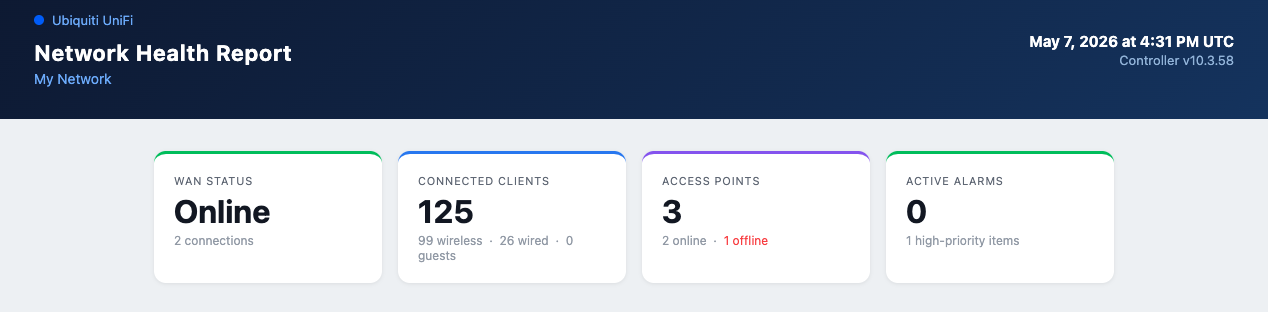
If you run a self-hosted Ubiquiti UniFi network — whether it’s a home lab, small business, or multi-site setup — you know the UniFi dashboard is great for real-time monitoring but falls short when you want a clean summary you can save, share, or review later. I built UniFi Network Health Report to fill that gap: a Python tool that connects to your controller and generates a standalone HTML report covering everything that matters.
What It Does
Run one command and get a timestamped HTML file — no external dependencies, no JavaScript frameworks, no internet connection required to view it. The report covers:
- Dual-WAN status — IP, ISP, availability %, latency, uptime, and media type per connection
- Speedtest results — last download/upload/ping pulled directly from the controller
- Gateway stats — CPU, memory, and uptime for your UDM/UDM-SE/UDM-Pro
- Top bandwidth consumers — which devices are eating your pipe
- Wireless Networks — SSID table with security type, bands, and client counts broken out by user / IoT / guest
- VPN status — remote user sessions and site-to-site toggle
- Networks & VLANs — every configured network with VLAN ID, subnet, and DHCP status
- Access point health — per-AP clients, TX retry %, channel, uptime, and auto-generated status badges
- Switch overview — port count, PoE budget (used W vs. total W), and expandable port error dropdowns with full RX/TX breakdown
- Firmware compliance — every device with its version and whether an upgrade is available
- Auto-generated recommendations — prioritized action items flagged by configurable thresholds
Why I Built It
The UniFi dashboard is excellent for live monitoring, but there’s no built-in way to generate a weekly summary, email a health snapshot to a client, or keep a historical record of what your network looked like last Tuesday. I wanted something I could run on demand, open in a browser, and hand off to someone without them needing a UniFi login.
The tool targets self-hosted controllers — UDM, UDM-SE, UDM-Pro, and standalone Network Application installs. It handles the UDM’s /proxy/network/ API prefix automatically and degrades gracefully when endpoints aren’t available (the REST events endpoint was removed in Network Application 10.x — the tool detects this and skips the section cleanly rather than crashing).
Getting Started
# Clone and install
git clone https://github.com/FryguyPA/Unifi_Network_Health_Report.git
cd Unifi_Network_Health_Report
pip install -r requirements.txt

# Configure
cp config.example.yaml config.yaml
# Edit config.yaml with your controller IP, username, and password

# Run — prompts you to pick a site if you have more than one
python generate_report.py --open
The --open flag opens the report in your default browser immediately. Use --debug to see exactly which API endpoints are being called.
Site Discovery
Rather than hard-coding a site name in your config, the tool logs into your controller, fetches all accessible sites, and presents a numbered list. If you only have one site it selects it automatically — great for multi-site setups.
Configuration
unifi:
  host: "192.168.1.1"
  port: 443           # 443 for UDM/UDM-Pro, 8443 for standalone app
  username: "admin"
  password: "your-password"
  verify_ssl: false

report:
  site_name: "My Network"
  output_dir: "reports"
  timezone: "America/Chicago"
  thresholds:
    ap_retry_pct: 5.0
    ap_reboot_days: 7
    switch_error_rate: 100
Tested On
Built and tested against a UDM-SE running Network Application 10.3.58 / firmware 5.0.16. Should work on any UDM-family device or standalone Network Application install.
Source Code
Full source on GitHub under the Apache 2.0 license:
👉 github.com/FryguyPA/Unifi_Network_Health_Report
Pull requests, issues, and feedback welcome!