
MTU Path Test — Find Where a Path Silently Fragments, Hop by Hop
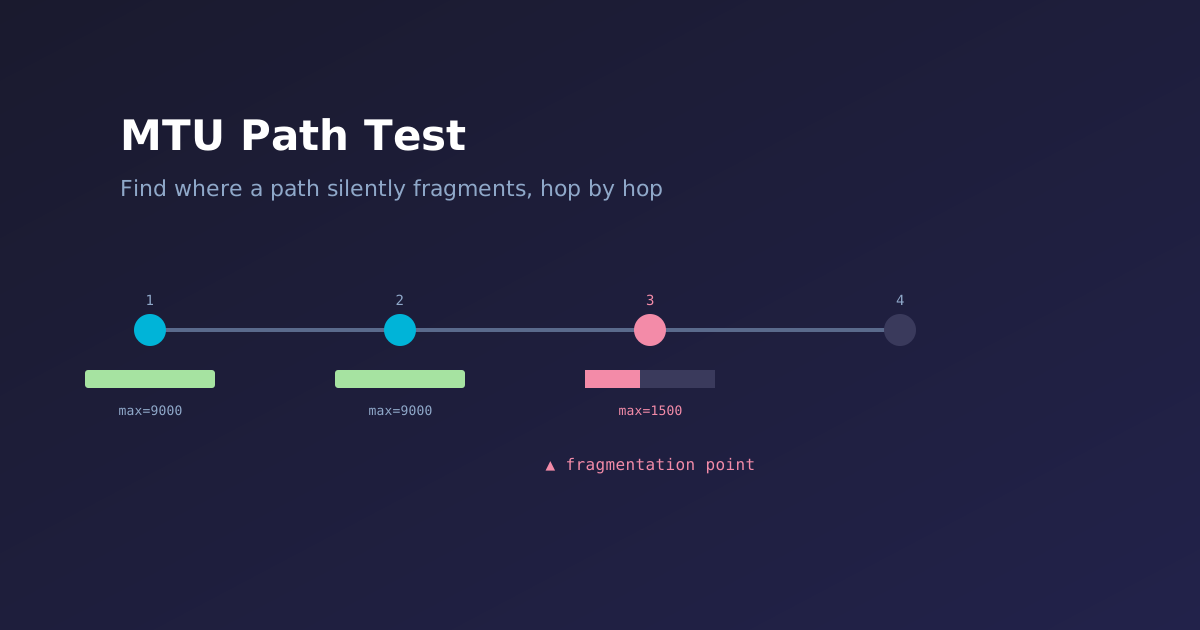
MTU problems are some of the most annoying things to troubleshoot in networking, because they’re usually silent. Small packets sail through fine, everything looks healthy, and then someone complains that a specific app is slow or hanging — and it turns out one link in the path, three hops in, has an MTU 8 bytes smaller than everyone assumed. GRE, IPsec, PPPoE, a VPN overlay, a jumbo-frame config that only got applied to half the path, a VLAN tag quietly adding 4 bytes nobody accounted for, or just two vendors defining and displaying “MTU” differently (L2 vs. L3, tagged vs. untagged) — any of these can quietly clip your effective MTU, and standard ping/traceroute won’t tell you where.
I built MTU Path Test to answer that question directly: trace the path to a target, and at every hop, find out exactly how large a packet gets through — and if it doesn’t, who’s responsible.
What it does
For each hop in the path, the tool sends two probes per packet size:
- A DF-set probe (Don’t Fragment bit on). If a link along the way is too small, the offending router replies with an ICMP “Fragmentation Needed” message — which hands us that router’s own IP and the link MTU it’s enforcing.
- A DF-clear probe (fragmentation allowed). This confirms whether the packet actually gets through when fragmentation is allowed, rather than just assuming it does.
Together, that pair tells you three things per hop: the largest packet that gets through without fragmenting, the largest one that gets through at all, and — critically — exactly where fragmentation starts happening and what MTU triggered it.
The size sweep is deliberately uneven: 1-byte resolution right around the standard 1500-byte Ethernet MTU, and coarse 500-byte jumps once you’re up in jumbo-frame territory. That’s on purpose — almost all real-world breakage clusters near 1500 (PPPoE eats 8 bytes, GRE eats 24, IPsec eats anywhere from 50 to 130), so that’s where you want pinpoint accuracy. Above that, you usually just want to know whether a size gets through, not the exact byte.
Sample output
══════════════════════════════════════════════════════════════════════════════
  MTU Path Test  →  target: 8.8.8.8
  Tested range: 1300 → 9000 bytes  (dual probe: DF-set + DF-clear per size; fine step under 1500, coarse above)
══════════════════════════════════════════════════════════════════════════════
  [ 1] ●  192.168.1.1  (router.local)
        │ no-frag : ████████████████████████████  max=9000
        │ w/ frag : ████████████████████████████  max=9000
        │ frag pt : none in tested range
        ▼
  [ 2] ●  10.0.0.1
        │ no-frag : ████░░░░░░░░░░░░░░░░░░░░░░░░  max=2000
        │ w/ frag : ████████████████████████████  max=9000
        │ frag pt : 2500 → via 10.0.0.5 (link MTU 1500)
        ▼
  [ 3] ◆  8.8.8.8
        │ no-frag : ████░░░░░░░░░░░░░░░░░░░░░░░░  max=2000
        │ w/ frag : ████████████████████████████  max=9000
        │ frag pt : 2500 → via 10.0.0.5 (link MTU 1500)
══════════════════════════════════════════════════════════════════════════════
  No-frag Path MTU:    2000 bytes
  Frag-OK Path MTU:    9000 bytes
  First fragmentation: hop 2 (10.0.0.1) starts fragmenting at 2500 — 10.0.0.5 (link MTU 1500)
══════════════════════════════════════════════════════════════════════════════
That “First fragmentation” line is the whole point of the tool — instead of “somewhere in the path, packets bigger than X don’t arrive whole,” you get the specific router and the specific link MTU that’s causing it.
Runs anywhere — four implementations, same behavior
This is the part I spent the most time on, honestly: the tool ships as Python, bash, PowerShell, and Go, all with identical flags, identical sweep logic, and identical output. Pick whichever one matches the box you’re standing on:
- Python (3.9+) — works anywhere with
tracerouteandpingon PATH. - bash — same behavior, zero dependencies beyond
traceroute/ping. Drop it on any macOS or Linux box. - PowerShell (5.1+ built into Windows, or 7+) — wraps
ping.exe/tracert.exefor native Windows use, no WSL required. - Go — compiles to a single static binary (~3.5 MB) with no runtime dependency at all. Cross-compiles from any machine to Linux, macOS, or Windows, which makes it the right choice for dropping onto a locked-down box that has neither Python nor a shell you trust.
All four handle the platform differences under the hood — BSD ping’s -D vs. iputils’ -M do vs. Windows’ -f for the Don’t-Fragment flag, the fact that macOS’s -W is milliseconds while Linux iputils’ -W is seconds, different traceroute hop-count flags, different “Fragmentation Needed” wording between BSD and iputils — so you don’t have to remember any of that yourself.
Quick start
# single target, sensible defaults (1300 → 9000, fine step near 1500)
python3 mtu_path_test.py 8.8.8.8
./mtu_path_test.sh        8.8.8.8

# multiple targets, or a file of them
./mtu_path_test.sh 8.8.8.8 1.1.1.1 --file targets.txt

# Go: build once, drop the binary anywhere
go build -o mtu_path_test
./mtu_path_test 8.8.8.8
# Windows / PowerShell
.\mtu_path_test.ps1 8.8.8.8
.\mtu_path_test.ps1 -Iface "Ethernet" 8.8.8.8Every implementation also writes a timestamped, ANSI-stripped log file per target by default (8.8.8.8_20260813_120000.log), and shows a live probing [37/216] size=1336 ... status line on the terminal while it works — so it doesn’t look like it’s hung on a slow hop.
A couple of honest caveats
- Some routers rate-limit or drop ICMP outright. Those hops show up as “no response” and get skipped — that’s normal network behavior, not a bug in the tool.
- If a router fragments traffic but its “Fragmentation Needed” reply gets filtered or rate-limited, the tool still correctly detects that fragmentation is happening (DF fails, non-DF succeeds) — it just can’t tell you who’s doing it, and reports the hop as “(router silent — ICMP rate-limited or filtered)” instead of guessing.
- No IPv6 support yet — the overhead math and ping flags would need to change. It’s on the list.
The HOWITWORKS.md file in the repo goes a lot deeper if you want the full probing model, the exact ping invocations per platform, and how the retry logic filters out ICMP rate-limiting noise instead of misreporting it as a real MTU boundary.
Get it on GitHub
Four implementations, a Go test suite (22 tests) and a Python test suite (36 tests), and CI running both across Linux/macOS/Windows on every push:
https://github.com/FryguyPA/path_mtu_test
Grab whichever version fits your box, and open an issue if you hit a path or a platform quirk it doesn’t handle right.