
New Tool - VLAN / QinQ Tag Overhead Calculator
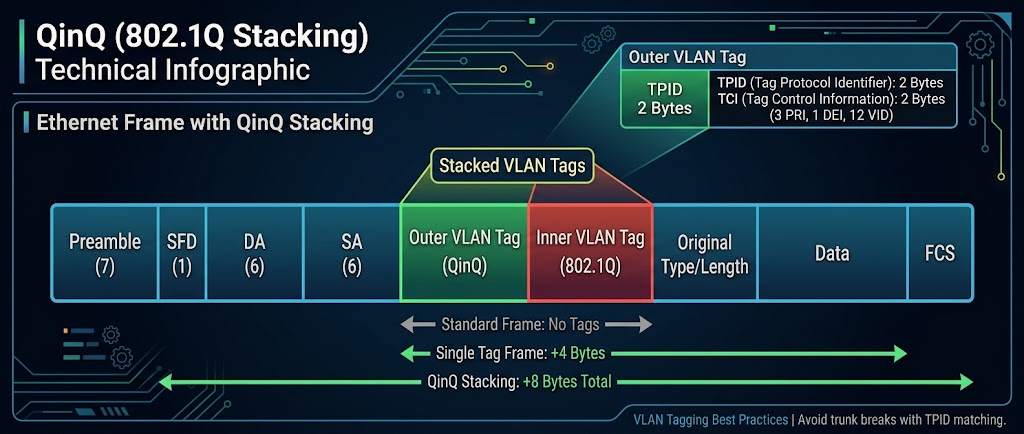
New on the Network Tools page: a VLAN / QinQ Tag Overhead Calculator. It exists because of the same problem that led to the MTU / Encapsulation Overhead Calculator — vendors don’t agree on what a config knob actually means, and it costs you an afternoon before you find that out.
The history behind this one
The MTU tool exists because mtu isn’t the same number on every platform. Classic Cisco IOS treats it as the L3 payload size. Junos and IOS-XR fold the 14-byte Ethernet header into it. Same command, same-looking number, two different frames on the wire — and the failure mode is never an error message, it’s just silent fragmentation or a black-holed jumbo-frame flow that only shows up under load.
Building that tool surfaced a nastier cousin of the same problem one layer down: VLAN tagging itself. Specifically QinQ — double-tagging a frame with an outer “provider” tag and an inner “customer” tag. The outer tag has to carry an EtherType (TPID) that says “this is a provider tag,” and vendors don’t default to the same one:
- Cisco’s classic
dot1q-tunnel, Junos’sflexible-vlan-tagging, and Arista’s QinQ all default the outer tag to 0x8100 — legacy behavior, not the actual 802.1ad standard. - FortiGate’s QinQ feature is built around 802.1ad directly, defaulting to the standard 0x88a8.
Mix them and the trunk comes up, passes traffic, and quietly corrupts it — no link-down, no error counter, just wrong behavior that looks like something else is broken.
What the tool does
- Tag Stack — pick untagged / single 802.1Q / QinQ / triple-tag, see the exact byte overhead and resulting frame size.
- Configured Interface MTU — set your target payload (defaults to 1500) and get the actual
mtunumber to configure on Cisco IOS/IOS-XE, Juniper Junos, FortiGate/FortiOS, and Arista EOS for the current tag stack. This is where the Junos-vs-everyone-else split from the MTU tool shows up again: add QinQ tags at MTU 1500 and Junos needs1522while Cisco/FortiGate/Arista stay at1500, because only Junos’smtucounts the L2 header and tags against the number. - Vendor QinQ Interop Checker — pick any two of Cisco IOS/IOS-XE, Juniper Junos, FortiGate/FortiOS, Arista EOS, or Palo Alto PAN-OS and it tells you straight up whether their default outer TPIDs match, with the actual config command to fix it if they don’t.
One more thing worth knowing before you plan around it: Palo Alto PAN-OS doesn’t reliably terminate QinQ at all. 0x88a8-tagged traffic gets treated as an unknown EtherType, and there’s a years-old open feature request for real 802.1ad support with no committed timeline. If a PAN-OS box is in the path, terminate the double-tagged trunk somewhere else.
Runs entirely in your browser, nothing sent anywhere.