10. John Chambers Keynote
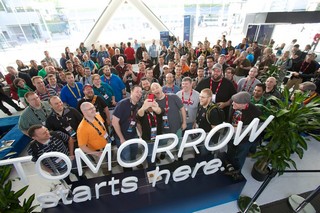
This year will mark John Chambers last Cisco Live Keynote as CEO of Cisco, ending his 20 year run in the position. In case you may have missed the announcement, starting on July 26th, Chuck Robbins will take over as CEO. This keynote will be John’s farewell and perhaps the welcoming of Chuck into that role. I am looking forward to what this keynote will be, but whatever it is it should be memorable and a not-to-miss event.
9. Sessions
Sessions, sessions, sessions. There are hundreds of sessions to choose from this year. Have you made your selections yet – no, then click here and get started!
8. DevNet Zone
DevNet Zone is a recent introduction at Cisco Live, but it is an important introduction. It is a place where Developers can get together and share information, learn new topics, as well as show of what they know. This is the place to learn about SDN and learn how you can use SDN in your position. If you love programming, this is YOUR Cisco Live! Still not sure what DevNet is about, check out this video from Cisco Live Milan.

 It is finally official, Juniper has extended their certification expiration from two years to three years.
Originally Juniper certifications where active for 2 years, and then you had 1 year after that to renew. If you did not re-certify prior to the 2–year anniversary, you went into an inactive status for a year with your certification. Then if you did not renew within that two years, your certification became expired and you would have to take the test(s) again to regain that certification. What Juniper has now done is give you three years of active status, and you need to re-certify prior to the 3rd year anniversary – there is no more inactive status. While this does alleviate much pressure on candidates (it can be hard to re-certify every certification every two years), it also means that the motivation factor of “inactive” status is gone.
I just logged into my CertManager portal page to check on my certifications as I know I had one that was in inactive status. It is now active, but now shows _Expiring._ At least that tells you that you need to re certify soon! Luckily they do also list the date of the Expiration on the page, so you know your drop-dead deadline.
If you have a Juniper certification and want to check its status, you can do that by going to their CertManager page.
You can see the announcement at the following link:
It is finally official, Juniper has extended their certification expiration from two years to three years.
Originally Juniper certifications where active for 2 years, and then you had 1 year after that to renew. If you did not re-certify prior to the 2–year anniversary, you went into an inactive status for a year with your certification. Then if you did not renew within that two years, your certification became expired and you would have to take the test(s) again to regain that certification. What Juniper has now done is give you three years of active status, and you need to re-certify prior to the 3rd year anniversary – there is no more inactive status. While this does alleviate much pressure on candidates (it can be hard to re-certify every certification every two years), it also means that the motivation factor of “inactive” status is gone.
I just logged into my CertManager portal page to check on my certifications as I know I had one that was in inactive status. It is now active, but now shows _Expiring._ At least that tells you that you need to re certify soon! Luckily they do also list the date of the Expiration on the page, so you know your drop-dead deadline.
If you have a Juniper certification and want to check its status, you can do that by going to their CertManager page.
You can see the announcement at the following link:
 Coming this November, Juniper has finally jumped into the Customer Summit bandwagon. This is something that has been asked for for many years now, a way for Juniper customers and advocates to get together and talk Juniper. This event will allow you to connect with your peers in the industry, meet current and potential new customers, and connect with Juniper leadership. Some of the primary topics of the inaugural event this year is:
 Back in 1993 the CCIE Cisco Certification, the first Cisco certification, was created and tested. Yes, the CCIE certification came years before the CCNA certification (1998) and thus Cisco needed a way to weed out candidates who were not ready for the CCIE lab exam. What they came up with was a Written pre-qualification exam to show that the candidate was ready to attempt the CCIE Lab exam. The CCIE Written is not a certification in itself, even though many job seekers seem to think that it is, it is just a qualifier to show that the candidate is ready to attempt the CCIE lab exam. To this day the CCIE written is still needed, regardless if the candidate does not have or has other Cisco certifications. Today though, with all the Cisco certifications, training, and the amount of Cisco networking gear in the enterprise, it is quite different and begs the question, “Does the CCIE Written still make sense today?”



 Cisco Live is coming up fast, just over a week away as I write this.
So I figured I would share some quick updates with you as you prep for the trip.
Are you on Twitter? If you are be sure to add yourself to the Cisco Live 2015 Twitter list at
Cisco Live is coming up fast, just over a week away as I write this.
So I figured I would share some quick updates with you as you prep for the trip.
Are you on Twitter? If you are be sure to add yourself to the Cisco Live 2015 Twitter list at 
 The other week (3/11/15) I was invited by Juniper Networks to their Sunnyvale, CA HQ location to particiapte in their 2015 Innovation Showcase. I have participated in
 Continuing on with the “What’s in my toolbag” series (
 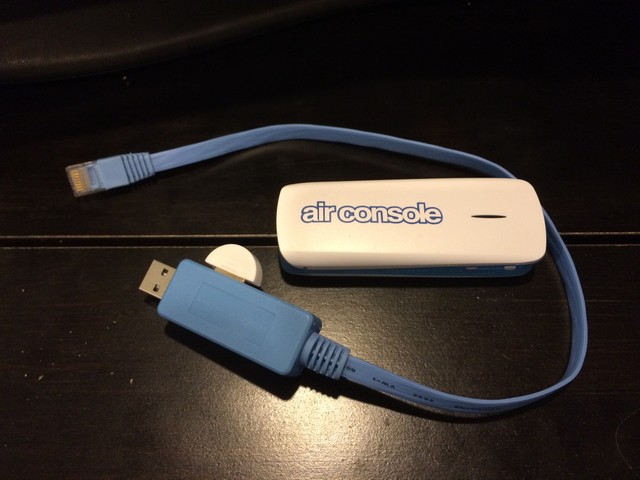 The first thing worth mentioning with the Airconsole is that fact that it has an Ethernet port on it. What is this good for? Well, the airconsole is also a WiFi and Bluetooth device that can come in handy for more than just console access.
 Building on the “What’s in my toolbag” series that I revisited last week with the