
What's in my toolbag – Update 1 – Fluke LinkSprinter 200
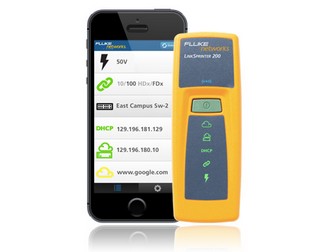 A few years back some of us wrote on a common theme around our tools and tool-bags. These posts turned out to be quite popular and informative to many in the community, including ourselves. Since the original post back in 2011, I have added a few new toys tools to my tool-bag and figured it was time to share some of the updates with you.
My first post will be about Fluke LinkSprinter 200. Before I get started, I just want to give a shout-out to a fellow Tech Field Day delegate, Bob McCouch over at HerdingPackets.Net , for telling me about this tool.
So what is so special about the LinkSprinter 200 and why do you need one?
Simple, just ask yourself if have you ever had to…
A few years back some of us wrote on a common theme around our tools and tool-bags. These posts turned out to be quite popular and informative to many in the community, including ourselves. Since the original post back in 2011, I have added a few new toys tools to my tool-bag and figured it was time to share some of the updates with you.
My first post will be about Fluke LinkSprinter 200. Before I get started, I just want to give a shout-out to a fellow Tech Field Day delegate, Bob McCouch over at HerdingPackets.Net , for telling me about this tool.
So what is so special about the LinkSprinter 200 and why do you need one?
Simple, just ask yourself if have you ever had to…- Track down what switch and port a network element (Computer, Server, WAP, etc) is connected to?
- Find out what VLAN a port is in?
- Does the port support PoE?
- Check to make sure DHCP is working?
- Find out what speed and duplex a port can operating at?
- Do you have connectivity to your gateway and the internet?
The LinkSprinter 200 tool can do all of that and fast! I used it for a network migration the other day and it saved us hours of work. Normally we have to trace cables to find where printers are plugged into so we can change VLANs and port configurations. Normally this takes about 10–20 minutes per printer, with the LinkSPrinter we were able to get all the printers done in about 10 minutes.
 The time has come to announce the guest closing Keynote speaker for Thursday! This information is hot off the press so be prepared for some serious excitement!
The closing Keynote speaker is going to be just AWESOME. I have been asking, as well as have others, for a few years to get this man for the closing keynote. He is a person whom I have a lot of respect for. I respect him because he has embraced the cause to teach us about hard work. determination, and perseverance.. I will also admit that he is a man who I have a “man crush” on. Without further delay and embellishment, it is none other than the former late night host of QVC,_ **Mike Rowe**_! (Yeah OK – he has done a few other great shows like
The time has come to announce the guest closing Keynote speaker for Thursday! This information is hot off the press so be prepared for some serious excitement!
The closing Keynote speaker is going to be just AWESOME. I have been asking, as well as have others, for a few years to get this man for the closing keynote. He is a person whom I have a lot of respect for. I respect him because he has embraced the cause to teach us about hard work. determination, and perseverance.. I will also admit that he is a man who I have a “man crush” on. Without further delay and embellishment, it is none other than the former late night host of QVC,_ **Mike Rowe**_! (Yeah OK – he has done a few other great shows like 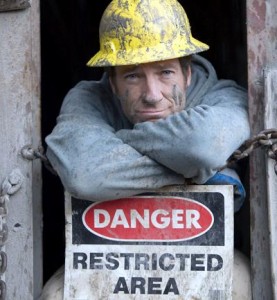 ][1]
][1]
 I finally did it! I cut the cord on cable today (2/7/15).
I have been considering cutting the cord for about a year or so now, but never was really motivated to cut it. My cable bill was high (over $200/mo), but I was in a bundled package with my cable, internet, and phone – so the amount of work to get out of that just seemed to much. That was until I received my January 2015 cable bill – that bill was almost $300/mo! Not sure what happened, but from what I can understand all the cable companies (not just mine) prices jumped in January 2015. Finally the pain of paying that bill every month was too great for me to bear anymore and I started the work for cutting the cord.
The first thing I actually did was start to look at ordering TV from a satellite provider as that rate would be less than I was paying now. I was so close to ordering oh so many times, eventually realized that I would be getting myself back into a long-term contract again. I said to myself and my wife that it was time to just bite the bullet and figure this out.
[
I finally did it! I cut the cord on cable today (2/7/15).
I have been considering cutting the cord for about a year or so now, but never was really motivated to cut it. My cable bill was high (over $200/mo), but I was in a bundled package with my cable, internet, and phone – so the amount of work to get out of that just seemed to much. That was until I received my January 2015 cable bill – that bill was almost $300/mo! Not sure what happened, but from what I can understand all the cable companies (not just mine) prices jumped in January 2015. Finally the pain of paying that bill every month was too great for me to bear anymore and I started the work for cutting the cord.
The first thing I actually did was start to look at ordering TV from a satellite provider as that rate would be less than I was paying now. I was so close to ordering oh so many times, eventually realized that I would be getting myself back into a long-term contract again. I said to myself and my wife that it was time to just bite the bullet and figure this out.
[ ][1]
][1]



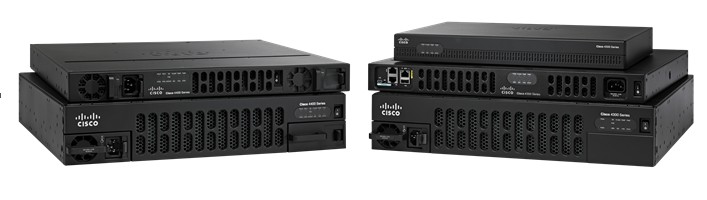 In June of 2013 Cisco released the newest member of the ISR family, the ISR4451-X router (Cisco –