/images/logo.png
A Network Blog by a Network Engineer

EX4400 VC Ports Conversation

This week I am in the Juniper Campus Networks with Mist AI ( JCMA ) course and going over the labs. I ran into a problem where the EX4400-24T et-0/1/0 and et-1/1/1 ports did not appear in in the Junos configuration nor the Mist portal. The configuration was in the portal via the templates, but the ports did not exist on the switch.

I have seen similar conditions as these ports can also be used for the Virtual Chasis (VC) ports. What I did find interesting is that the normal way I have always changed VC-Ports on Junos did not work.

First, let us look at the vc-ports on this EX4400-24T:

{master:0}
lab@ex2> show virtual-chassis vc-port 
fpc0:
--------------------------------------------------------------------------
Interface   Type              Trunk  Status       Speed        Neighbor
or                             ID                 (mbps)       ID  Interface
PIC / Port
1/0         Configured         -1    Down         50000
1/1         Configured         -1    Down         50000
1/2         Configured         -1    Down         50000
1/3         Configured         -1    Down         50000

As you can see, we have 4 VC-Ports configured on Pic 1 – Ports 0-3.

Cisco Live 2022 – Are you ready?

Soon, many of us will be on an airplane heading to Las Vegas for Cisco Live 2022. So I felt that it might be good to put out some final information before we head out. Below you will find some info on the Cisco Events App, Health and Safety info, as well as NetVet reception updates.

Cisco recently updated its Cisco Events application for Cisco Live 2022, this is a must-have application for an attendee. This application is your go-to for everything CIsco Live, as you can see from the images below, it has all the relevant information you need – the Session Catalog, the All Sessions section has your Schedule for the sessions you have signed up for as well.

Cisco Cat9300X – Tech Field Day

The other week I had the privilege of participating in Tech Field Day Exclusive with Cisco 2022. One of the presentations that I enjoyed was the talk on the C9300X. I think this is because I am currently working heavily with them on a current project

As I said, the Cisco Catalyst 9300 is a switch family that I am familiar with due to my current work environment. I have deployed all different models from C9300-48U-A, C9300-48UN-A, to the C9300-48UXM-A. They have been a reliable switch from my experience, albeit a bit of pain due to the interface naming differences between the models. ( that is another blog post altogether )

Cisco Enterprise Networks Presents at Tech Field Day Exclusive with Cisco 2022

I am honored to be welcomed back to Tech Field Day Exclusive with Cisco scheduled on 16-17 March 2022. It will be a live-streamed event that you can watch over on the Tech Field Day site during the event, or on their YouTube channel shortly after.

The schedule for the event is as follows:

Wed Mar 1611:00a – 2:00p ESTCisco Enterprise Networks
Wed Mar 162:00p – 5:15p ESTCisco Meraki
Thurs Mar 1711:00a – 4:00p ESTCisco

See you there!

Cisco Live 2022 – Good vibes again!

It should be safe to say that most of us have had a tough time these past two years, no matter what our view of things – the world has changed around us. We all have been learning to adapt, understand, and cope with what has happened. I am sure that we are all looking to get back to some normalcy in our lives.

“Troubles, they may come and go, but good times, they're the gold.”
― Dave Matthews Band

In the past one of our normalcies has been an event called Cisco Live – or Nerd Camp as some of us have come to affectionately call it. It is a place where you gather with friends who share the same passions, a place where you make new acquaintances, and ultimately a place where we learn new technologies together for the networking world.

Our last in-person event was in 2019 in San Diego, CA – since then Cisco Live has been forced to go online only due to the changes in the world Granted we still got our dose of new technology learning from a firehose with the online sessions, but they are just not the same as being in a classroom setting listening to the speaker. Online sessions are missing the human touch that we get by being in person at the event, by asking questions in the session, by conversing with the speakers after the session, and ultimately by connecting to our peers in the session. Online sessions are missing the interactions we can gain when we are together.


“I'll lean on you and you lean on me and we'll be okay.”
― 
Dave Matthews Band
Cisco Live 2021 – Online

It is that time of year again, just not quite the same as it once was. Once again Cisco Live has been forced to be on-line only due to the pandemic, let us just hope this is the last time as I miss seeing everyone – as I am sure you all do as well.

In case you missed it, Cisco Live is going to be at the end of this month ( March ) for 2-days – the 30th and 31st. This year, unlike last year, there are two pass options – one Explorer (Free) and another All Access ($349). Both seem to give you access to the basics, but the All-Access pass will include the technical sessions. You can see more about the registration here: Registration Packages.

Juniper SRX DNS Proxy Configuration (Split-DNS)

This post is intended to show you how to configure a Juniper SRX to be a DNS proxy for your network. This will allow you to forward DNS queries to both a private DNS server for your local domain and a public DNS server for all other requests.

Using the SRX as a DNS proxy has a few advantages for a network administrator. The first being that if you need to ever change an upstream DNS server pointer, you just need to update the SRX and not all the clients. The second is that if you want to split domain name DNS queries among different DNS servers, you can do that. This is good if you have a .local domain server locally or over a VPN. This will allow you to keep that query local, yet all other requests will go to a public DNS server.

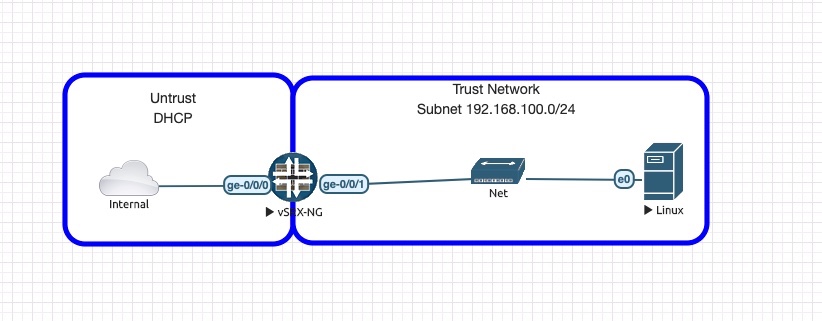
The topology for this lab is as follows:

  • The internal network in this topology is my Home network that is providing access to the Internet.
  • The SRX is configured with DHCP on the UNTRUST side to obtain an IP from my home network.
  • SRX is configured with a static IP of 192.168.100.1/24 on the TRUST side.
  • SRX is acting as DHCP server for 192.168.100.0/24 and serving DNS server IP of 192.168.100.1.
  • The SRX is NATing all traffic from TRUST to the UNTRUST interface.
  • Linux host is a simple Ubuntu 16.04 desktop default in EVE-NG.

You can find a copy of the EVE-NG topology as well as the SRX start and final configs in my github repository: https://github.com/FryguyPA/Junos-SRX-DNS-Proxy

Broadcom #NFD22

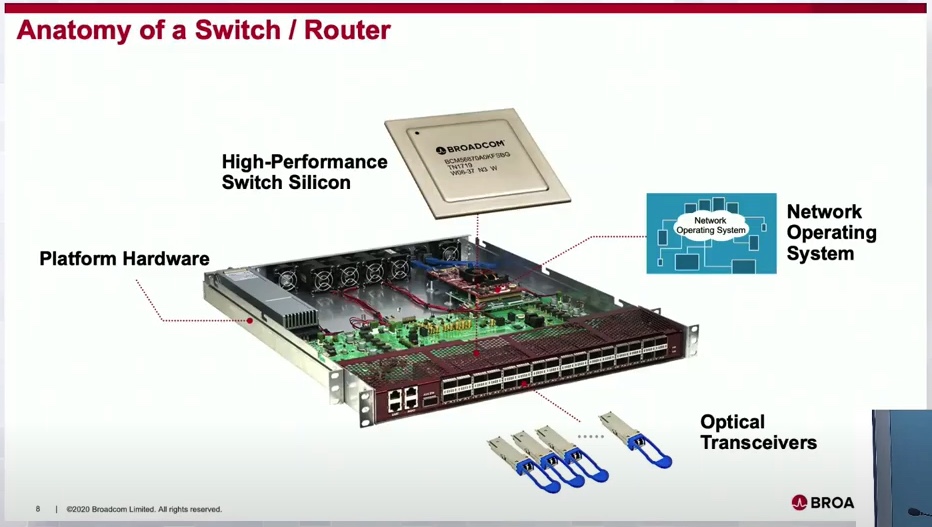
I have one way to describe the Broadcom session at NFD22, that term is NERDGASM! The presenters had to be some of the guys who are designing these chips, the depth of knowledge they had was incredible.

Broadcom are the engineers that make the merchant silicon chips that manufacturers like Cisco, Juniper, Arista, etc all use in their hardware. As you can see from the slide above, Broadcom is the heart of the unit as it is the silicon inside the switch/router.

PATCHBOX Setup.exe Review

Over the past few months, while browsing social media, I came across an ad for the PATCHBOX Setup.exe and it caught my attention. I have installed and removed many network switches over my career and it can be a challenge to do this alone. Even with help, it can be hard to balance a switch during an install ( they do get heavier as the night gets longer ) or trying to not get in the way of installing the screws in the rack. The Setup.exe bills itself as a “third hand.” In the words of George Takei, “Oh my!” Yeah, it definitely lives up to its billing.

As can be seen in the pictures above, it is a standard 1RU device that snaps into the rack via the two Quick Release pins. These pins are spring-loaded so you to quickly install or remove the device in the rack. It fits in just about any square hole type rack (think standard 4-post type). Surprisingly, the Setup.exe even fit my Skeletek rack that has a bit thicker front rail. Please be aware that this device does not work in racks with threaded holes.

Gluware #NFD22

Recently I attended Networking Field Day 22 (NFD22) in San Jose, CA as a delegate. By attending NFD you may be exposed to companies that you may not normally come across. The company that I am going to talk about here is called Gluware and more specifically about how they can help with keeping your network configurations in compliance with the desired state.

What Gluware is wants to do you for your business is be the solution that can solve the automation and configuration compliance challenges. Their mission is “to apply powerful intelligence to enable transformative automation.” They also did state that they are a multivendor and multidomain ( LAN / WAN / Wireless) solution, which in my experience is important as multi-vendor networks are common.

There was something they mentioned that resonated with me. It was how they summed up the current state of automation into three main parts: